Modern professional life depends on an intricate constellation of digital hardware: laptops, high-resolution external monitors, mechanical keyboards, audio interfaces, fast charging bricks, and external solid-state drives. Yet while technology continues to shrink in physical profile, the tangle of black vinyl power cords, USB cables, and bulky AC adapters required to power our daily workflows remains a persistent source of visual friction. A workstation designed with warm minimalist furniture can be instantly compromised by a chaotic nest of tangled wires dangling across the wall plane.
Key Takeaways
Architectural strategies for routing, concealing, and organizing technology infrastructure with zero visual noise:
- Under-desk horizontal steel wire raceways hide power surge protectors and transformer bricks completely from sight.
- High-density split braided fabric sleeving bundles disparate computer cables into a single architectural umbilical.
- Replacing utilitarian plastic cable bins with fluted oak or stoneware boxes integrates cord management into living decor.
- Counterweighted turned-brass or solid walnut magnetic collars prevent charging leads from dropping behind furniture.
- Structured travel tech folios keep adapters, memory cards, and charging leads organized in drawers without tangling.
Effective cable management is not merely an aesthetic indulgence; it is a foundational prerequisite for sustained cognitive focus. When working surfaces are free of electronic tangle, visual distractions vanish, creating a serene mental atmosphere conducive to deep work. To discover how micro-organizers bring order to internal desk drawers, explore our analysis of drawer division engineering and custom grid systems.
The Visual Noise of Tangled Technology: Designing Clean Sightlines
In interior architecture, the concept of visual noise refers to chaotic stimuli that compete for human attention. Cognitive neuroscience shows that our visual cortex constantly processes background clutter, generating low-level subconscious mental fatigue. Black plastic cables running along baseboards or hanging behind desks interrupt clean vertical sightlines, breaking the serene architectural envelope of a room.

Designing clean sightlines begins by establishing a single point of entry and exit for power. Rather than running five separate cables from desktop peripherals down to a wall outlet, consolidate all peripheral connections beneath the desk surface. By routing power through a single hidden umbilical, the desk appears to float effortlessly in space. To learn how lighting layers integrate into high-functioning workspaces, explore our guide on smart home protocols and ambient lighting systems.
Under-Desk Raceway Architecture: Channeling Power Bricks and Plugs
The core engine of successful cable management is an under-desk horizontal wire raceway. Standard adhesive cable clips or plastic ties inevitably peel off under the weight of heavy laptop power transformers, causing wires to sag into view after several weeks.

A heavy-gauge powder-coated steel or extruded aluminum raceway screwed securely into the underside of the desktop provides permanent structural support. Position an industrial-grade surge protector inside the tray along with your laptop docking station, monitor power supplies, and external hard drives. Excess wire length is coiled neatly with hook-and-loop fabric straps within the basket, ensuring zero cables droop below the desk edge, as highlighted in Architectural Digest home office ergonomics and clean workspace design.
Tactile Cable Boxes: Natural Timber and Matte Ceramics over Plastic
While under-desk raceways solve workstation wiring, living rooms and media credenzas present a different challenge. Floor lamps, television soundbars, gaming consoles, and Wi-Fi routers frequently congregate around wall power outlets, forming prominent dust traps that clash with refined living room aesthetics.

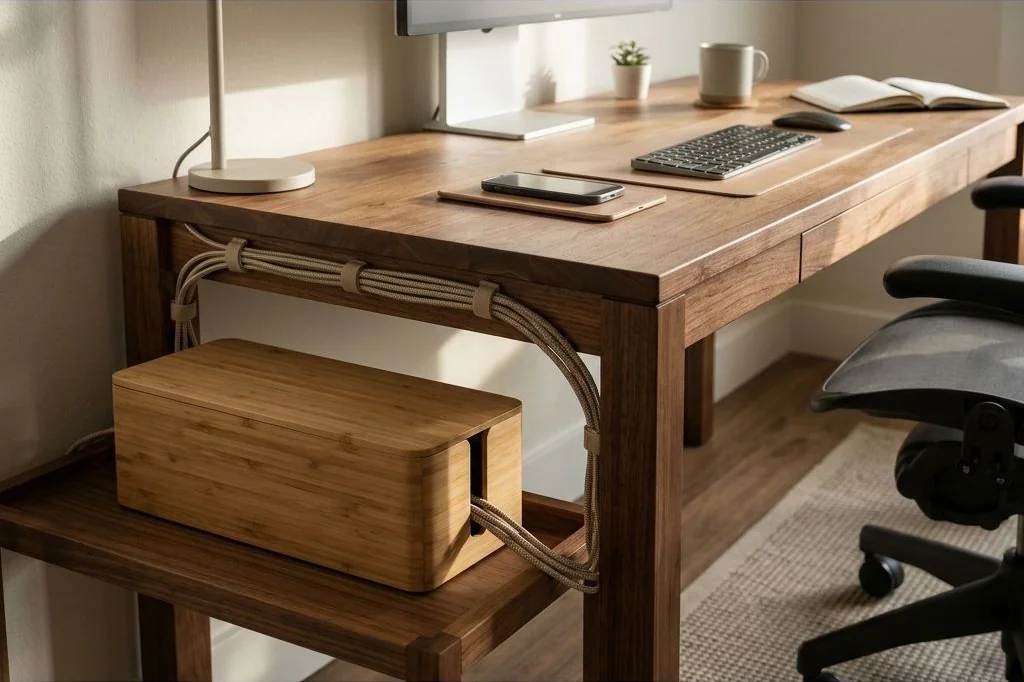
Commercial white plastic cord boxes look clinical and cheap in a thoughtfully curated living space. Upgrade to bespoke cable management boxes crafted from fluted white oak, solid walnut, or matte stoneware with discreet ventilation slots. These handsome vessels house six-outlet power strips and excess cord slack, resting against baseboards as sculptural decorative accents rather than utilitarian eyesores. Discover more tactile spatial tips at the Ornista architectural design studio.
Magnetic Cord Anchors and Counterweighted Cable Catchers
Few daily annoyances match the frustration of unplugging a mobile device or laptop only to watch the charging cable slip backward off the edge of the desk, falling into the dark void between the wall and the table leg. Repeatedly fishing cables from the floor causes unnecessary physical strain and irritates desktop focus.

Architectural magnetic cord anchors solve this friction permanently. A heavy, counterweighted brass or solid walnut base resting on your desk corner houses powerful neodymium magnets. Slender metal collars snapped around your braided USB-C and Lightning cables dock with a gentle acoustic click onto the base whenever disconnected. Your charging leads remain held at desk height, immediately accessible for your next device connection.
Divided Tech Accessory Cases: Travel and Drawer Readiness
Small electronic accessories – such as multi-port GaN wall chargers, HDMI adapters, memory cards, and portable wireless mice – easily scatter inside desk drawers or backpack compartments, turning into an entangled mass when traveling between home and remote workspaces.

Investing in a structured, book-style tech accessory folio made from water-resistant waxed canvas or textured recycled nylon provides portable order. Interior elastic webbing holds cords in neat flat loops, zippered mesh compartments secure small flash drives, and padded slots cradle external battery packs. When working from home, the folio rests open inside your desk drawer as an organized tray; when heading out, simply zip it shut for immediate travel readiness.
Braided Sleeving and Monochromatic Cord Uniformity
In standing desk configurations, cables must physically travel from the moving desk surface down to the wall power receptacle. When three or four individual cables of varying colors and thicknesses hang loosely, they produce a distracting visual wobble whenever the desk ascends or descends.

High-density split braided fabric sleeving offers the ultimate cord dressing solution. The self-wrapping textile sleeve gathers multiple power and video cables into one clean, flexible bundle. Match the sleeve color to your desk leg or wall paint – matte black for industrial steel legs, or soft stone grey for light plaster walls. Magnetic cable guide clips anchor the braided sleeve straight down the inner profile of the rear desk leg, rendering the electrical connection virtually invisible from room seating angles.
Frequently Asked Questions
Common questions regarding home office cable management, safety, and desk aesthetics:
Is it safe to bundle multiple power cords tightly inside an under-desk raceway?
Yes, provided you do not coil high-wattage extension cords tightly into bundles that trap heat. Modern GaN charging bricks and computer power cords generate modest warmth that dissipates safely through open wire or ventilated metal raceways.
How much cable slack is needed for an adjustable standing desk?
Raise your standing desk to its maximum possible height before securing the main power umbilical cable to the wall. Ensure there is at least three to four inches of gentle slack at full extension so cables never pull taut or strain hardware ports during height transitions.
How do you clean dust from concealed cable management boxes?
Unplug the power strip annually and use a soft brush attachment on a cordless vacuum to remove accumulated textile lint and dust. In addition, using hook-and-loop cable ties rather than zip ties makes opening the box for quick vacuuming fast and tool-free.